

Download MacFamilyTree – Family Tree Software for macOS, Free Updates & 3‑D Visualisation
Overview
MacFamilyTree is a polished genealogical application designed exclusively for macOS users who want to explore, document, and showcase their ancestry in a visually striking way. The app combines a classic OS X‑style interface with modern 3‑D visualisation, allowing you to navigate your family branches as if they were living objects on a digital tabletop. Recent updates have added a free online search service that taps public archives, and an iCloud‑based publishing tool that lets you share your tree with relatives via a secure web link.
While it lacks the massive social networking engine of services like Genes Reunited, MacFamilyTree excels at turning raw data into an elegant, interactive experience. Whether you are a hobbyist genealogy enthusiast or a professional researcher, the software offers a balanced mix of data entry tools, reporting options, and multimedia support (photos, videos, audio clips). The intuitive drag‑and‑drop canvas, configurable themes, and live preview mode make it easy to experiment with different layouts without losing any data.
In short, MacFamilyTree brings your family history to life, providing a slick, secure, and constantly updated platform for anyone interested in uncovering their past.
Key Features & What Sets MacFamilyTree Apart
- 3‑D Tree Visualisation – Navigate branches with depth, rotate, zoom, and explore relationships in a three‑dimensional space.
- Free Online Search – Integrated access to public records and databases without additional subscription fees.
- iCloud Publishing – Securely share a live, interactive web version of your tree with family members.
- Multimedia Integration – Attach photos, video clips, PDFs, and audio recordings to individual profiles.
- Configurable Themes & Live Preview – Choose from several colour schemes and instantly see how changes affect the layout.
- Export Options – Generate PDFs, GEDCOM files, ID cards, and even direct FTP uploads with SSL support.
- Contact Management – Create detailed contact cards for each ancestor, complete with custom fields.
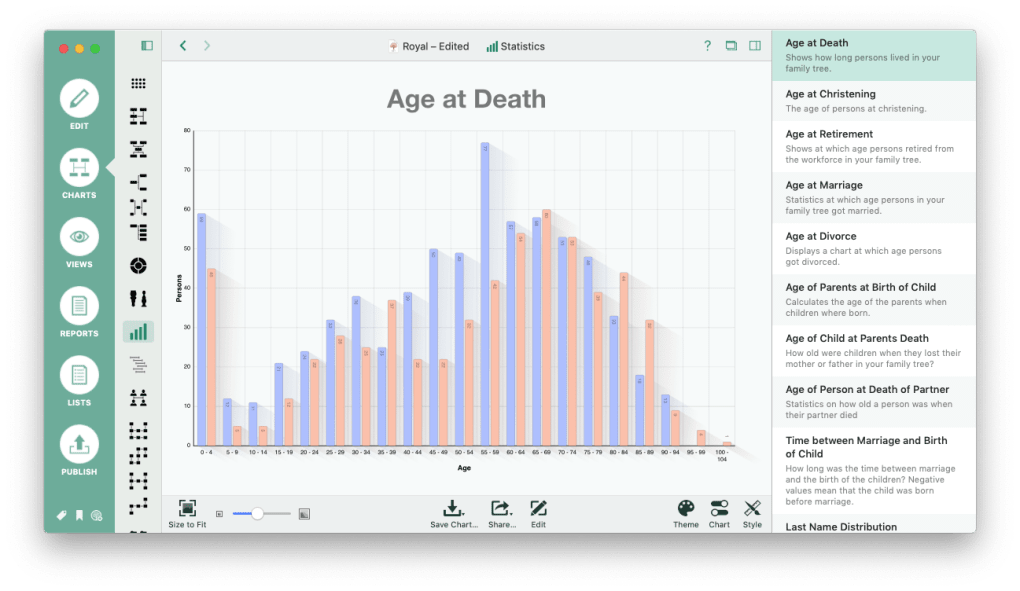
- Report Builder – Produce family reports, charts, and narrative histories with one‑click templates.
- Regular Free Updates – The development team pushes bug fixes, performance improvements, and new features at no extra cost.
Why These Features Matter
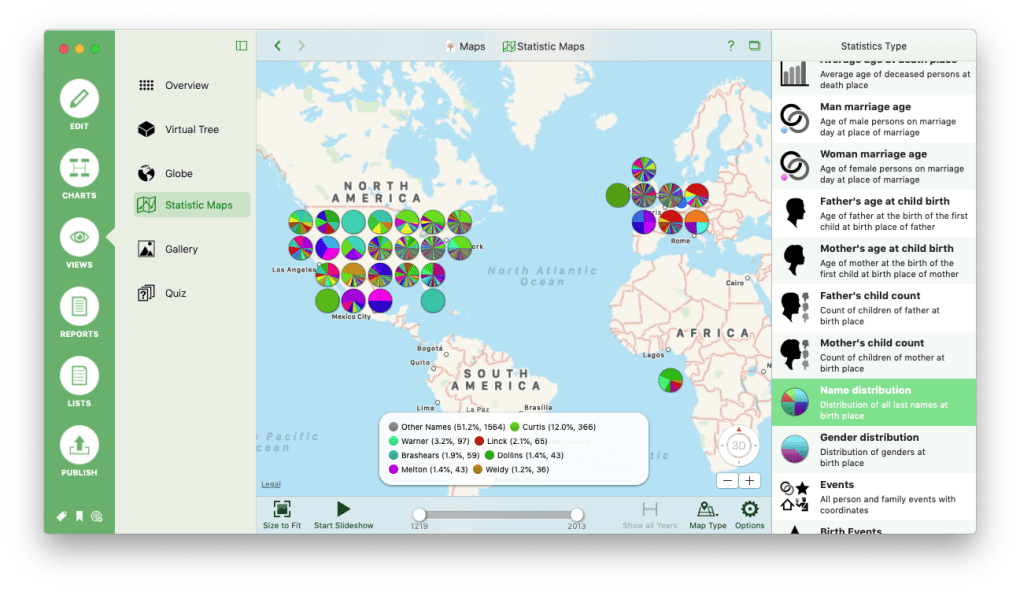
Genealogy software can be overwhelming when it focuses solely on data entry. MacFamilyTree’s 3‑D visual engine turns abstract relationships into something tangible, helping users spot patterns—such as repeated surnames or migration routes—more quickly than a flat chart would allow. The free online search eliminates the need for multiple subscriptions, streamlining the research process. Moreover, the iCloud publishing feature provides a private, password‑protected way to let distant relatives view and comment on the tree, fostering collaboration without exposing personal data to public sites.
Multimedia support transforms a sterile lineage list into a living archive. Imagine clicking on a great‑grandfather’s portrait to hear an old family story recorded on a cassette, or watching a video of a wedding ceremony from the 1950s. These rich details make the family narrative more engaging for younger generations, ensuring the legacy endures. Finally, the extensive export capabilities mean you can back up your work, share it with other genealogy programs, or embed it into a family website without hassle.
Installation, Usage & System Compatibility
Step‑by‑Step Installation
Downloading and installing MacFamilyTree is straightforward. Visit the official website, click the “Download for macOS” button, and the installer (.dmg) will appear in your Downloads folder. Open the file, drag the MacFamilyTree icon into your Applications folder, and launch the app. The first run triggers a brief setup wizard where you can import existing GEDCOM files, choose a default theme, and enable iCloud sync. All data is stored locally on your Mac, with optional cloud backup for added security.
System requirements are modest: macOS 10.14 (Mojave) or later, 2 GB RAM minimum (4 GB recommended), and at least 500 MB of free disk space for the core program. For large trees with extensive multimedia, allocate additional storage to avoid performance bottlenecks. The installer also includes a helper tool that registers the app for automatic updates, ensuring you always receive the latest features and security patches.
Getting Started with Your First Tree
After launching MacFamilyTree, you’ll be greeted by a clean dashboard. Click “Create New Tree” and enter the primary individual’s details—name, birth date, and any known relationships. The app automatically generates a basic pedigree chart, which you can expand by adding parents, siblings, spouses, and children. Use the drag‑and‑drop canvas to rearrange branches; the live preview instantly reflects your changes in 3‑D mode.
To enrich a profile, select the person’s card and click the “Media” tab. Here you can upload photos, embed video URLs, attach PDFs of birth certificates, or import audio recordings. The software automatically creates thumbnails and links them to the appropriate generation, keeping the visual layout uncluttered.
Compatibility & Performance Considerations
MacFamilyTree runs natively on macOS (10.14 and later). It does not have Windows, Android, or iOS versions, so users on those platforms must rely on alternative solutions or use a macOS virtual machine. The app supports 64‑bit architecture and leverages Metal graphics for smooth 3‑D rendering. However, users have reported occasional lag when handling extremely large trees (over 5,000 individuals) combined with high‑resolution media files. To mitigate this, keep your multimedia assets optimised (JPEG < 2 MB, MP4 < 10 MB) and consider splitting massive trees into separate sub‑trees linked via “Family Group” references.
Security is handled through macOS Gatekeeper and notarisation, guaranteeing that the binary is signed and free from malware. All iCloud communications are encrypted with TLS, and the direct FTP upload option supports FTPS for secure file transfer.
Pros, Cons & Frequently Asked Questions
Pros
- Stunning 3‑D visualisation makes genealogy engaging and intuitive.
- Free built‑in online search saves money on external subscriptions.
- iCloud publishing offers a private, secure way to share trees with family.
- Robust multimedia support adds depth to each ancestor’s profile.
- Regular free updates keep the software current and improve stability.
Cons
- Lacks a broad social network for discovering distant relatives.
- Performance may degrade with very large trees and extensive media.
- Only available for macOS; no native Windows, Android, or iOS versions.
- Advanced search across external databases is limited compared to dedicated genealogy portals.
FAQ – Your Most Common Questions Answered
Can I import an existing GEDCOM file into MacFamilyTree?
Yes. From the File menu select “Import > GEDCOM”. The wizard will map GEDCOM tags to MacFamilyTree fields, preserving relationships, dates, and notes. After import you can enrich each record with photos or media.
Is the online search feature truly free?
The integrated search accesses public records that are openly available. No additional subscription fees are required, though some external databases may still charge for premium documents.
How secure is my data when I publish to iCloud?
All data transferred to iCloud is encrypted in transit using TLS 1.2+ and stored at rest with Apple’s standard encryption. You can set a password for each published tree, limiting access to invited relatives only.
Can I export my tree to other genealogy programs?
Yes. MacFamilyTree supports exporting to GEDCOM, PDF, and CSV formats, allowing seamless migration to tools like Family Tree Maker, RootsMagic, or online services such as Ancestry.com.
What should I do if the app becomes unresponsive with a large tree?
First, save your work and close any other intensive applications. Reduce media file sizes or temporarily hide high‑resolution images via the “Media Manager”. If lag persists, consider splitting the tree into smaller sub‑trees and linking them with “Family Group” references. Updating to the latest version often includes performance patches.
Conclusion – Should You Download MacFamilyTree?
MacFamilyTree delivers a polished, user‑friendly environment for building and sharing family histories on macOS. Its standout 3‑D visualisation, free online search, and iCloud publishing set it apart from many competitors, making it an excellent choice for anyone who values visual storytelling and data security. While the lack of a broad social discovery network and occasional performance hiccups with massive trees may be drawbacks for power users, the overall experience is smooth, secure, and regularly updated at no extra cost.
If you’re ready to transform rows of names into an interactive, multimedia‑rich family saga, click the download button below, install the app, and start exploring your heritage today. Download MacFamilyTree now and bring your ancestors to life!
Pros: 3‑D view, free search, iCloud sharing, multimedia support.
Cons: macOS‑only, limited social network, occasional lag on huge trees.







